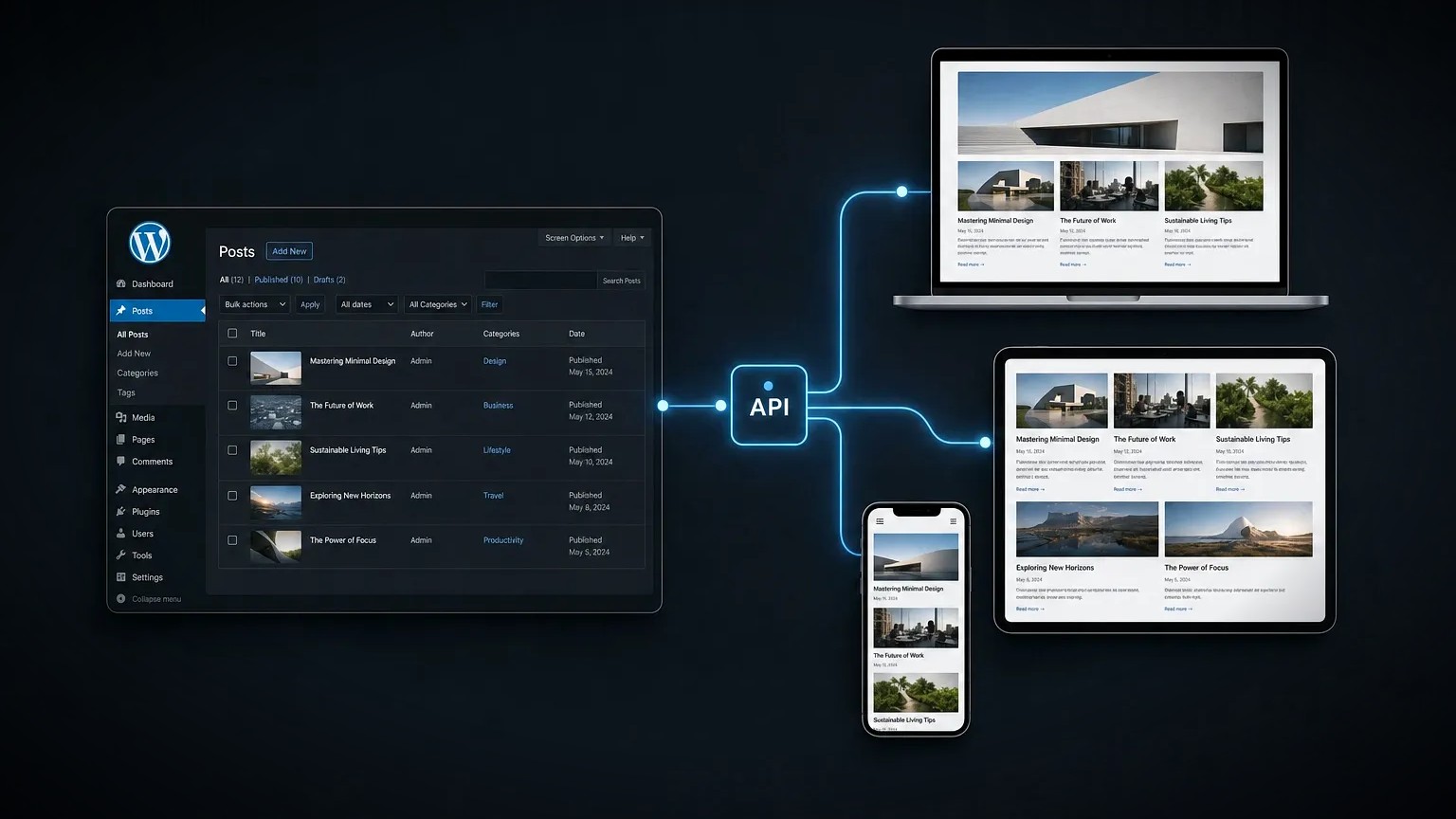
Headless WordPress means using WordPress purely as a content store and editor, while a separate, faster front end renders the actual website. The familiar WordPress admin stays for writing and managing content; the pages visitors see are built by a modern framework such as Astro or Next.js that pulls that content in through an API.
Headless WordPress is a setup where WordPress manages the content but does not render the site. The front end is decoupled and built with a separate framework that fetches content through the WordPress REST or GraphQL API. The result keeps WordPress editing while gaining the speed, security and flexibility of a custom front end.
The trade in one line: you keep the WordPress editing experience and gain a faster, more flexible front end, in exchange for a more complex, more expensive build.
- What you keep: the WordPress admin, editorial workflow and content model your team already knows.
- What you gain: speed, stronger security, and the freedom to build the front end with any modern framework.
- What it costs: a more complex architecture, higher build cost, and some WordPress features that no longer work out of the box.
What is headless WordPress, exactly?
Headless WordPress is traditional WordPress with the front end removed, so the content management system and the website become two separate applications. In a standard WordPress site, a theme takes the content and renders the pages in one system. In a headless setup, WordPress only stores and serves the content, and a separate front-end application requests that content through the WordPress REST API or a GraphQL layer, then renders the pages itself.
The practical effect is a clean split of responsibilities. Editors log into the same WordPress dashboard and write exactly as before. Developers build the visitor-facing site with a framework of their choice, most commonly a static or hybrid build with Astro, Next.js or a similar tool, and deploy it separately, often to a global edge network. WordPress becomes the engine room that nobody but the editors sees, and the front end becomes a fast, custom layer that everyone else does. The connection between the two is the API: when the front end is built or a page is requested, it asks WordPress for the latest content and turns it into finished HTML. Nothing about the editing experience changes; everything about how the site is delivered does.
How does headless WordPress differ from traditional WordPress?
Headless WordPress differs from traditional WordPress in one fundamental way: the front end is decoupled from the content management. That single change ripples out into performance, security, cost and which features work. The table below sets the common approaches side by side.
| Approach | How it works | Best for |
|---|---|---|
| Traditional WordPress | A theme renders pages directly from WordPress on each request | Sites that need easy editing and the huge plugin ecosystem |
| Headless WordPress | WordPress stores the content; a separate framework renders the front end | Teams that want WordPress editing with a faster, custom front end |
| Static build with a headless CMS | Content comes from a CMS and is rendered to static files at build time | Sites that prize speed and security over very frequent editing |
Traditional WordPress is the right default for most sites: it is quick to build, endlessly extensible through plugins, and every part works together out of the box. Headless WordPress trades some of that convenience for a faster, more secure and more flexible front end. A fully static build with a headless CMS, such as Astro paired with Sanity or Storyblok, goes further still on speed and security, at the cost of the live, dynamic behaviour WordPress plugins provide.
What are the pros and cons of headless WordPress?
The pros of headless WordPress are speed, security and flexibility; the cons are complexity, cost and lost plugin behaviour. Whether the trade is worth it depends entirely on the site, the team and the budget.
- Pro, performance: a decoupled front end, often static and served from the edge, is typically much faster than a theme rendering on every request.
- Pro, security: the WordPress admin can be locked away from the public front end, shrinking the attack surface that makes WordPress a common target.
- Pro, flexibility: the front end can be built with any modern framework and reused across a website, an app and other channels from the same content.
- Con, complexity: two applications, an API between them and a separate deployment pipeline are more to build and maintain than one WordPress install.
- Con, cost: the extra architecture means a higher upfront build cost and usually a developer to maintain it.
- Con, lost features: many plugins that rely on the theme, live preview and some page builders do not work as they do on a traditional site.
When should you use headless WordPress?
You should use headless WordPress when a site needs both the WordPress editing experience and a level of speed, security or flexibility that a traditional theme cannot reach. For a straightforward brochure or small business site, that threshold is rarely met, and traditional WordPress or a static build is the better value.
Headless earns its cost on higher-traffic, higher-stakes sites: a busy publisher where speed drives ad revenue, a brand that serves the same content to a website and a mobile app, or an organisation with strict security requirements. It also suits teams that already have front-end developers and want full control over the visitor experience. A useful test is to name the specific benefit the project needs from going headless, faster pages, multi-channel content or tighter security, and confirm a traditional build genuinely cannot deliver it. If no single benefit stands out clearly, that is a strong sign a simpler build is the better choice. If none of those apply, the honest answer is usually that a well-built traditional WordPress site, or an Astro build with a headless CMS, will serve better for less. Choosing headless because it sounds modern, rather than because the project needs it, is a common and expensive mistake.
What are the common pitfalls of going headless?
The common pitfalls of headless WordPress come from underestimating the added complexity and the features that stop working. Teams often move to headless expecting only benefits and meet the trade-offs after the build has started.
- Losing editor previews: live preview and some builder-based editing do not work the same way, which can frustrate content teams.
- Plugin gaps: forms, SEO plugins and others that assume a WordPress theme may need to be replaced or rebuilt on the front end.
- Underestimating maintenance: two systems and an API mean more to keep updated and monitor than a single install.
- Over-engineering small sites: adopting headless for a site that a traditional build would have served perfectly well, adding cost with no real return.
- Weak content modelling: without a clear content structure in WordPress, the flexibility of a custom front end turns into confusion.
Is headless WordPress worth the cost?
Headless WordPress is worth the cost when the gains in speed, security or flexibility translate into real business value, not when they are simply nice to have. The build costs more up front and needs ongoing developer support, so the return has to come from somewhere concrete.
For a high-traffic site, faster pages can mean measurably more revenue, through ad impressions, conversions or less wasted ad spend, and that easily justifies the extra build. For a brand publishing to a website and an app, reusing one content source across both saves duplicated effort over time. For most small business and brochure sites, though, the numbers do not add up: a well-optimised traditional WordPress site, or an Astro build with a headless CMS, delivers most of the speed and security for a fraction of the cost and complexity. The right question is never whether headless is impressive, it is whether the project will earn back what the extra architecture costs to build and maintain.
Your headless WordPress decision checklist
Before committing to headless WordPress, work through these questions. If most answers point to yes, headless is likely worth it; if not, a traditional or static build will serve better.
- Does the site need speed or security beyond what a well-optimised traditional theme delivers?
- Will the same content feed more than one channel, such as a website and an app?
- Is there a budget for a more complex build and its ongoing maintenance?
- Is there front-end development capability to build and support the decoupled site?
- Have you confirmed the plugins and workflows the team relies on will still work?
Headless WordPress is a powerful option, not a default. Used where a project genuinely needs it, it delivers WordPress editing with a fast, secure, flexible front end. Used everywhere, it adds cost and complexity for little gain. The right call comes from the project, not the trend, which is the same discipline behind every website build.
Frequently asked questions
What is headless WordPress?
Headless WordPress is a setup where WordPress manages and stores the content but does not render the website. A separate front-end application, built with a framework such as Astro or Next.js, fetches the content through the WordPress REST API or GraphQL and renders the pages, so editing stays in WordPress while delivery is decoupled. To talk through whether it fits your project, get in touch.
What is the difference between headless and traditional WordPress?
In traditional WordPress, a theme renders the pages directly from WordPress. In headless WordPress, the front end is decoupled: WordPress only serves content through an API, and a separate framework renders the site. Headless usually gains speed, security and flexibility, at the cost of more complexity and a higher build price.
Is headless WordPress better for SEO?
Headless WordPress can be better for SEO mainly because a decoupled, often static front end is faster and passes Core Web Vitals more easily. The gain is not automatic, though: the front end must be built with correct semantic markup, metadata and structured data, and some WordPress SEO plugins need replacing on the new front end.
When should you use headless WordPress?
Use headless WordPress when a site needs both the WordPress editor and a level of speed, security or flexibility a traditional theme cannot reach, such as a high-traffic publisher, a brand serving content to several channels, or a security-sensitive organisation. For most brochure and small business sites, a traditional or static build is better value.
What are the disadvantages of headless WordPress?
The main disadvantages of headless WordPress are added complexity, higher build and maintenance cost, and lost functionality. Two systems and an API are more to maintain than one install, and many plugins, live preview and some page builders do not work as they do on a traditional WordPress theme.